Upscaling with Lumabox (Powered by Nano Banana AI)
Lumabox’s AI image upscaler gives your images a natural, high-resolution finish — not by stretching pixels, but by understanding what’s in the picture and painting new detail.
Powered by Nano Banana AI, this feature intelligently reconstructs textures, lighting, and edges to produce images that feel real, not artificial.
What Makes Lumabox’s Upscaler Different
Traditional upscaling simply multiplies pixels, often resulting in blur or loss of sharpness.
Lumabox’s upscaler, built on Nano Banana AI, repaints images intelligently. It analyzes composition, materials, and lighting — then rebuilds the image at a higher resolution that looks authentically detailed.
Key features:
- Interprets content to fill missing details meaningfully.
- Maintains texture, color harmony, and lighting balance.
- Avoids edge blur and artificial noise.
- Works directly on generated results — no separate export required.

Let's zoom in a bit on the upscaled result:
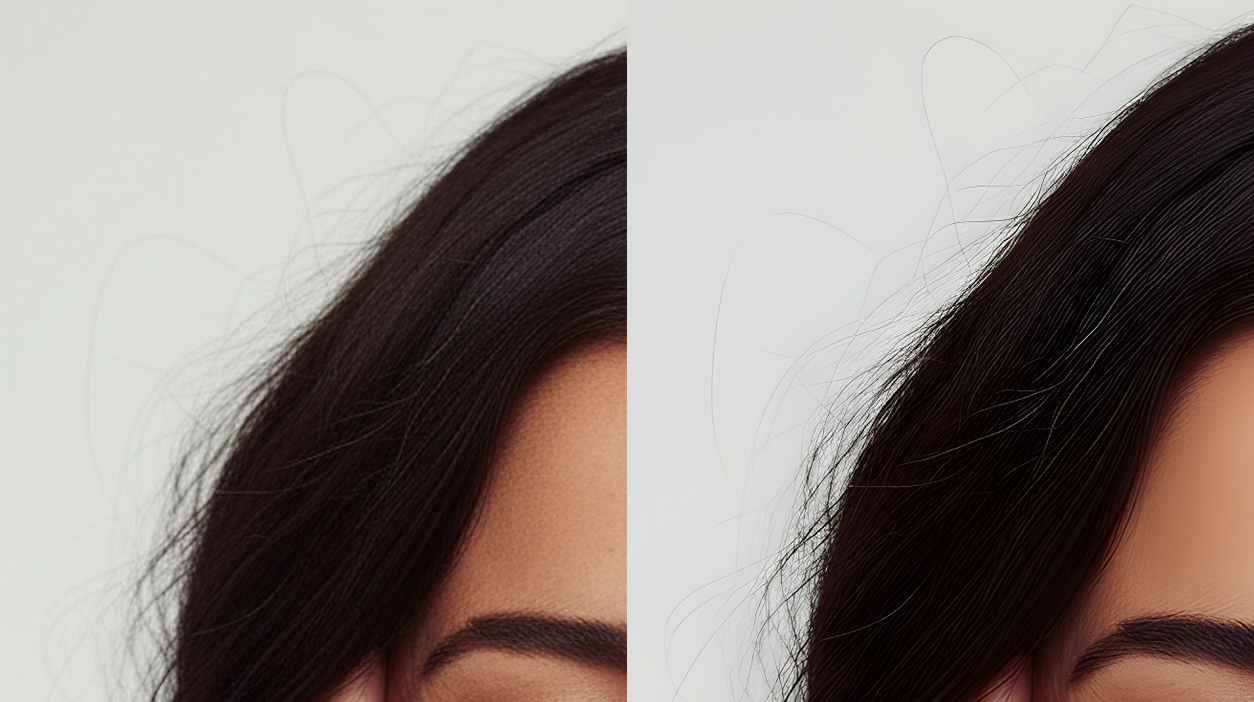
The details of the hair is a great example of how upscaling in Lumabox is repainting the image in higher resolution.
How to Use Upscaling in Lumabox
Upscaling is integrated directly into Lumabox’s image cards — simple, seamless, and fast.
Steps:
- Find a generated image in your workspace.
- Hover or tap the Upscale icon on the image card.
- Choose 2× or 4× upscale. 4x generation normally takes longer.
- The system uses Nano Banana AI to intelligently repaint the image.
- Download or save the high-resolution version instantly.
⚠️ To preserve quality, you cannot upscale an image that’s already been upscaled once.
You will only see this upscale option in your own workspace.
The Technology Behind Nano Banana AI Upscaling
Nano Banana AI doesn’t simply stretch pixels — it rebuilds images with awareness of structure and light.
The model analyzes each element in context, predicting what higher-resolution details should look like.
How it works:
- Context-aware enhancement – interprets edges, depth, and surface materials.
- Semantic understanding – knows what’s being upscaled (skin, metal, wood, etc.).
- Fine-texture rendering – adds realistic patterns, shadows, and depth.
- 4K-ready output – ideal for professional design, print, and display.

Let's zoom in a bit on the upscaled result:
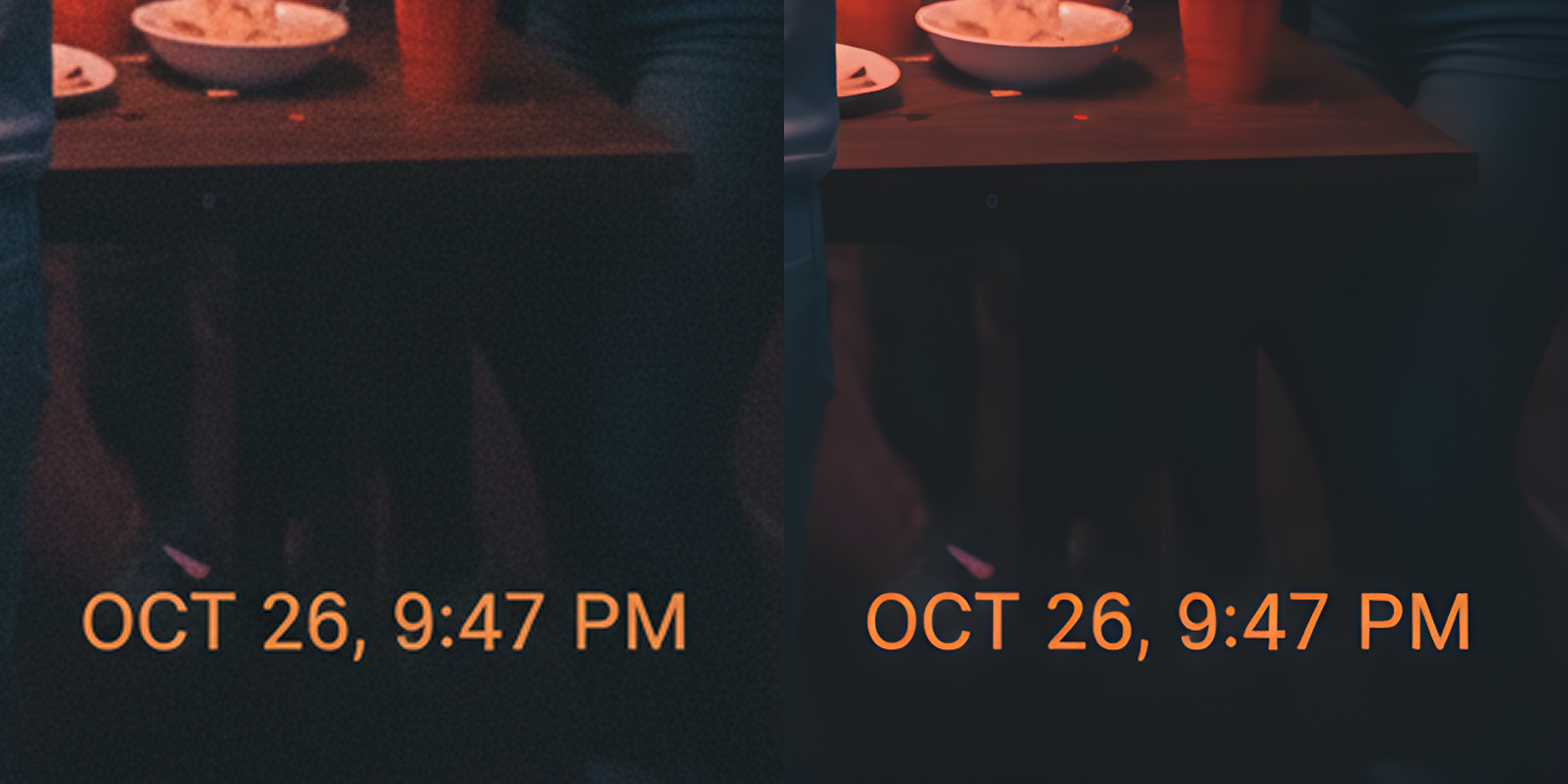
In this example, we can see that texts are also perfectly being upscaled.
When to Use Lumabox’s AI Upscaler
Lumabox’s intelligent image upscaler enhances any visual where quality and realism matter:
- 🏠 Interior Design — upscale AI-generated rooms for client presentations or print.
- ⚙️ Product Design — enhance material realism for concept showcases.
- 🎨 Creative Illustration — refine edges and shading in digital artwork.
- 📢 Marketing Imagery — improve clarity and resolution for ads or social posts.
Pricing and Credit Usage
Upscaling follows the same credit-based system as other Lumabox features:
- 0.5 credits → 2× upscale
- 1 credits → 4× upscale
All new users receive 20 free credits at signup.
Credits never expire and can be used across generation, editing, and upscaling features.
Lumabox’s credit model keeps pricing transparent and flexible — no hidden costs.
Why Designers Prefer Lumabox’s Upscaler
- Built on Nano Banana AI for intelligent image reconstruction.
- Seamlessly integrated into every generated image card.
- Produces authentic, high-resolution detail instead of artificial sharpness.
- Offers one-click 2× or 4× upscaling with context-aware rendering.
Try Lumabox — powered by Nano Banana AI. Upscale smarter, not just bigger.
Frequently Asked Questions
What is Lumabox’s AI upscaler?
It’s an intelligent enhancement tool powered by Nano Banana AI that repaints images in higher resolution instead of just resizing them.
Can I upscale any image?
Yes, as long as it hasn’t already been upscaled. This helps maintain accuracy and avoid redundant resizing.
What’s the difference between 2× and 4× upscaling?
2× upscaling is faster and lighter, ideal for web previews.
4× delivers ultra-detailed images for print or large display use.
Does upscaling cost credits?
Yes. 0.5 credits for 2× and 1 credit for 4× upscaling.
Is it free to try?
Yes, every new user gets 20 free credits to explore generation, editing, and upscaling.
Lumabox — powered by Nano Banana AI. Enhance intelligently, design beautifully.
ChatGPT can make mistakes. Check important info.